Part 1: The Frontend
Overview
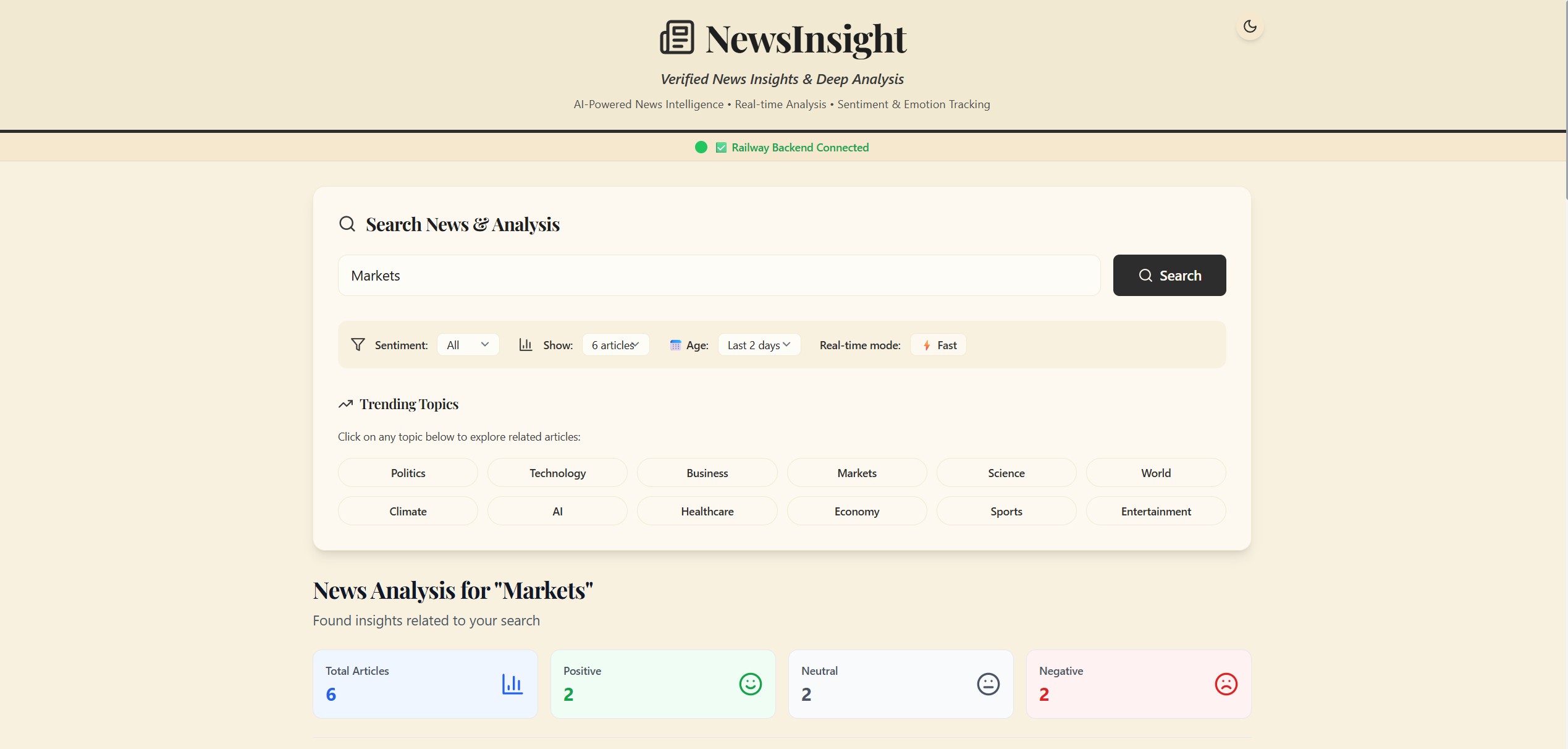
I wanted to build an AI-powered platform that doesn’t just aggregate articles but analyzes them. I wanted to use AWS Bedrock to detect emotions—is this article written with fear? Is there joy in this announcement?—and present it all through a slick, modern interface.
Before we dive into the code, let’s look at the big picture. I architected the system into three main pillars:
| Pillar | Description | Deployment |
|---|---|---|
| The Face | React-based Single Page Application (SPA) | Vercel |
| The Brain | FastAPI backend | Railway |
| The Muscle | AWS Glue ETL job for nightly article ingestion | AWS |
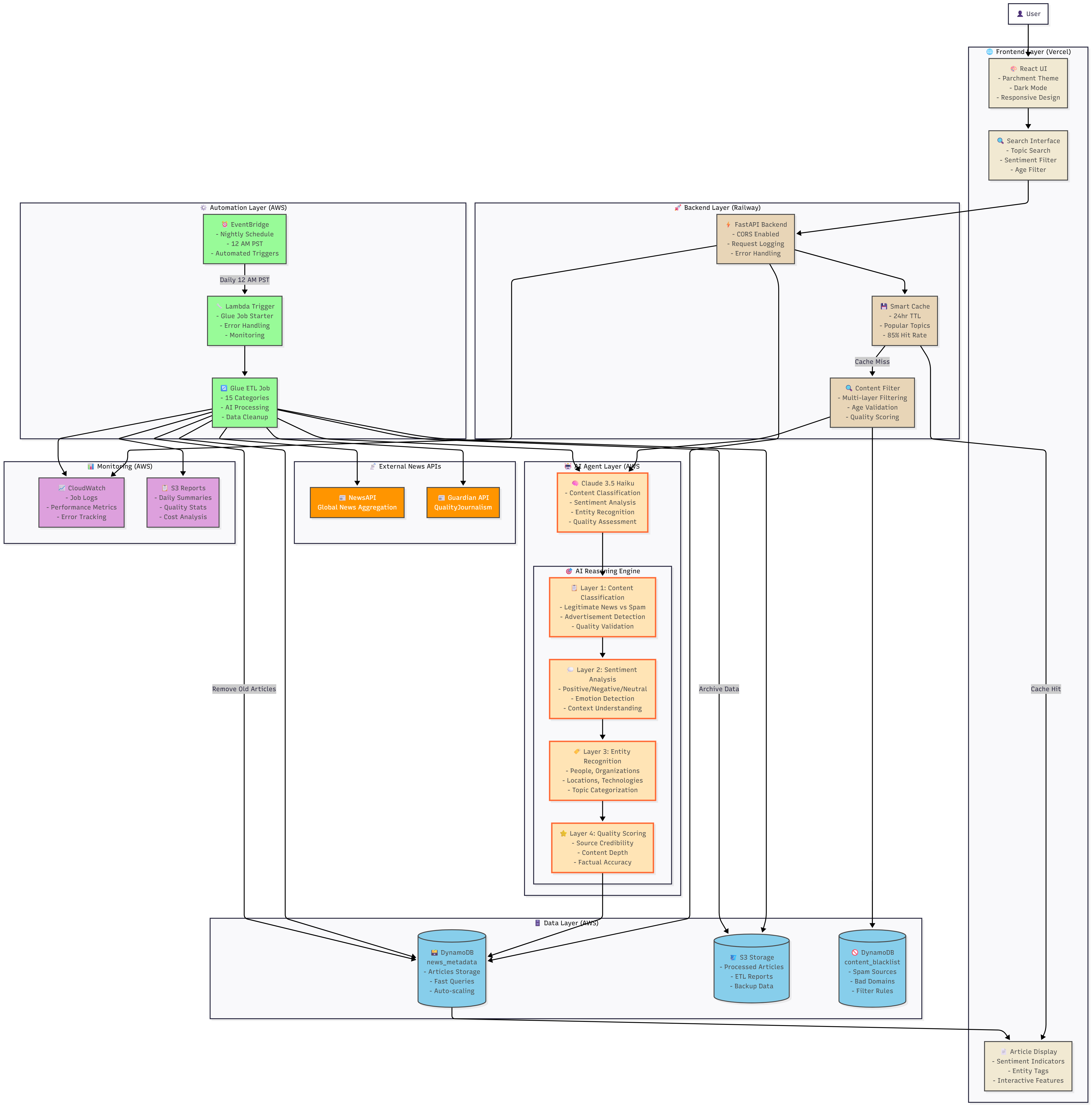
Table of Contents
- Design Philosophy & Requirements
- Component Architecture
- Key Components Deep Dive
- The API Service Layer
- Issues Encountered & Fixes
1. Design Philosophy & Requirements
When I sat down to sketch out the frontend, I knew the requirements list was going to be ambitious. I didn’t just want a dashboard—the goal was to create something that felt responsive and alive.
I needed:
- Real-time news search with instant feedback
- Intuitive data visualization
- A way to visually represent the “vibe” of an article
Tech Stack Selection
| Technology | Version | Purpose |
|---|---|---|
| React | 18.2.0 | Modern hooks-based architecture |
| Tailwind CSS | 3.3.6 | Utility-first styling with custom theme |
| Framer Motion | 10.x | Smooth animations and transitions |
| Axios | 1.6.2 | HTTP client with interceptors |
| React Router | 6.x | Client-side routing |
| React Hot Toast | - | Non-intrusive notifications |
| Lucide React | - | Consistent, clean icon library |
Why These Choices?
React was the clear winner for the foundation. With its component-based architecture, I could break down complex UI elements—like the sentiment analysis charts or the news cards—into modular, reusable chunks. Plus, the ecosystem is massive.
Tailwind CSS is a superpower for rapid prototyping. Being able to define a custom theme in the config and then fly through the styling process using utility classes saved me hours of context switching between CSS files and JSX.
Framer Motion adds that layer of polish. When a user searches for news, I wanted the results to glide in, not just pop into existence—without bloating the bundle size.
Axios over the native fetch API because it’s more robust. I needed reliable error handling and the ability to use request/response interceptors to handle auth tokens seamlessly.
2. Component Architecture
src/
├── App.js                    # Root component, routing, providers
├── index.js                  # React entry point
├── index.css                 # Global styles, Tailwind imports
│
├── contexts/
│   └── ThemeContext.js       # Dark/light mode state management
│
├── pages/
│   └── HomePage.js           # Main page orchestrator
│
├── components/
│   ├── Header.js             # Branding, dark mode toggle
│   ├── SearchSection.js      # Search input, filters, trending topics
│   ├── StatsSection.js       # Sentiment distribution stats
│   ├── ArticleGrid.js        # Grid layout for articles
│   ├── ArticleCard.js        # Individual article display
│   ├── LoadingSpinner.js     # Loading state
│   └── EmptyState.js         # No results state
│
└── services/
    └── api.js                # API client, mock data fallback
3. Key Components Deep Dive
3.1 HomePage.js — The Orchestrator
If the application were a symphony, HomePage.js would be the conductor. It’s the central hub where state management meets data flow.
I decided early on that I didn’t want to scatter state logic across a dozen tiny components. I needed a single source of truth for the search terms, articles, and filters.
Managing the State
const [articles, setArticles] = useState([]);
const [loading, setLoading] = useState(false);
const [searchTerm, setSearchTerm] = useState('');
const [sentimentFilter, setSentimentFilter] = useState('All');
const [articleLimit, setArticleLimit] = useState(6);
const [ageFilter, setAgeFilter] = useState(2); // Days
const [railwayStatus, setRailwayStatus] = useState('testing');
The “Is It Alive?” Check
Since I deployed my backend on Railway (which spins down on the free tier), the first thing the app does is check the pulse of the server:
useEffect(() => {
  testRailwayConnection();
  loadArticles();
}, []);

const testRailwayConnection = async () => {
  try {
    const response = await axios.get(railwayUrl, { timeout: 10000 });
    setRailwayStatus('connected');
    toast.success('✅ Railway Backend Connected!');
  } catch (error) {
    setRailwayStatus('failed');
    toast.error('❌ Railway Connection Failed');
  }
};
Dual Loading Modes: REST vs. Streaming
This was one of the more interesting engineering challenges. Standard REST calls are fine for loading historical data, but when a user searches for something new, I wanted it to feel fast.
I implemented a split strategy:
const loadArticles = async (term = '', limit = 6) => {
  const shouldStream = term && term.length > 0;

  if (shouldStream && useStreaming) {
    loadArticlesStream(term, limit);  // The fast, real-time path
  } else {
    loadArticlesRegular(term, limit); // The standard data path
  }
};
3.2 ArticleCard.js — Making Data Human
The backend sends raw JSON data: sentiment scores, emotion vectors, and summaries. But a user doesn’t want to read JSON—they want to feel the news.
Visualizing Sentiment
I utilized color psychology here. A positive story shouldn’t look the same as a tragedy:
const getSentimentClass = (sentiment) => {
  if (!sentiment) return 'sentiment-neutral';
  const s = sentiment.toLowerCase();
  if (s.includes('positive')) return 'sentiment-positive';
  if (s.includes('negative')) return 'sentiment-negative';
  return 'sentiment-neutral';
};
The AI Chat Interface
This is where the “Insight” in NewsInsight comes from. I built a conversational chat interface right into the card using an optimistic UI update approach:
const handleChatSubmit = async (e) => {
  e.preventDefault();
  const userMessage = chatInput.trim();

  // Optimistic UI update: Show the message immediately
  setChatMessages([...chatMessages, { type: 'user', content: userMessage }]);

  // Then wait for the brain to respond
  const response = await chatWithArticle(
    article.id, article.summary, userMessage, chatMessages
  );

  setChatMessages([...newMessages, { type: 'assistant', content: response }]);
};
4. The API Service Layer
In src/services/api.js, I set up an Axios instance that acts as the gatekeeper for all traffic.
Global Error Handling with Interceptors
api.interceptors.response.use(
  (response) => response,
  (error) => {
    if (error.response) {
      throw new Error(error.response.data?.detail || 'Server error');
    } else if (error.request) {
      throw new Error('Network error - please check your connection');
    }
    throw new Error('Request failed');
  }
);
Graceful Fallback System
Sometimes backends crash. APIs hit rate limits. I didn’t want my portfolio site to look broken:
export const searchArticles = async (query = '', limit = 6, maxAgeDays = 2) => {
  try {
    const response = await api.get('/api/articles/search', {
      params: { query, limit, max_age_days: maxAgeDays }
    });
    return response.data;
  } catch (error) {
    console.log('🔄 Backend error, using mock data temporarily');
    return getMockArticles(query, limit);
  }
};
Server-Sent Events (SSE) for Real-Time Data
Standard REST APIs have a flaw: you wait for the entire process to finish before getting any data. For an AI-heavy app, a 5-second loading spinner feels like an eternity.
I chose SSE over WebSockets because I didn’t need bidirectional communication—just the server pushing data to the client as fast as possible:
export const searchArticlesStream = (query, limit, onUpdate) => {
  const url = `${baseURL}/api/articles/search-stream?query=${encodeURIComponent(query)}&limit=${limit}`;
  const eventSource = new EventSource(url);

  eventSource.onmessage = (event) => {
    const data = JSON.parse(event.data);
    onUpdate(data);
  };

  eventSource.onerror = () => {
    eventSource.close();
    onUpdate({ type: 'error', message: 'Connection lost' });
  };

  return () => eventSource.close();
};
This tiny piece of code completely changed the “feel” of the application. Instead of waiting, the user sees immediate action.
5. Issues Encountered & Fixes
No project is ever smooth sailing. Here are three specific headaches I ran into and how I solved them.
Issue 1: The Dreaded CORS Wall
Problem: Everything worked perfectly on localhost:3000. But the moment I deployed the frontend to Vercel and the backend to Railway, they stopped talking. I hit the classic “Cross-Origin Resource Sharing” error. My Vercel app was trying to fetch data, and the Railway server was slamming the door in its face for security reasons.
Fix: I updated the FastAPI middleware to explicitly whitelist my Vercel domains. This allows the browser to trust the relationship between the two distinct servers.
app.add_middleware(
    CORSMiddleware,
    allow_origins=[
        "https://news-insight-ai-tawny.vercel.app",
        "https://*.vercel.app",  # Allow preview deployments
    ],
    allow_credentials=True,
    allow_methods=["*"],
    allow_headers=["*"],
)
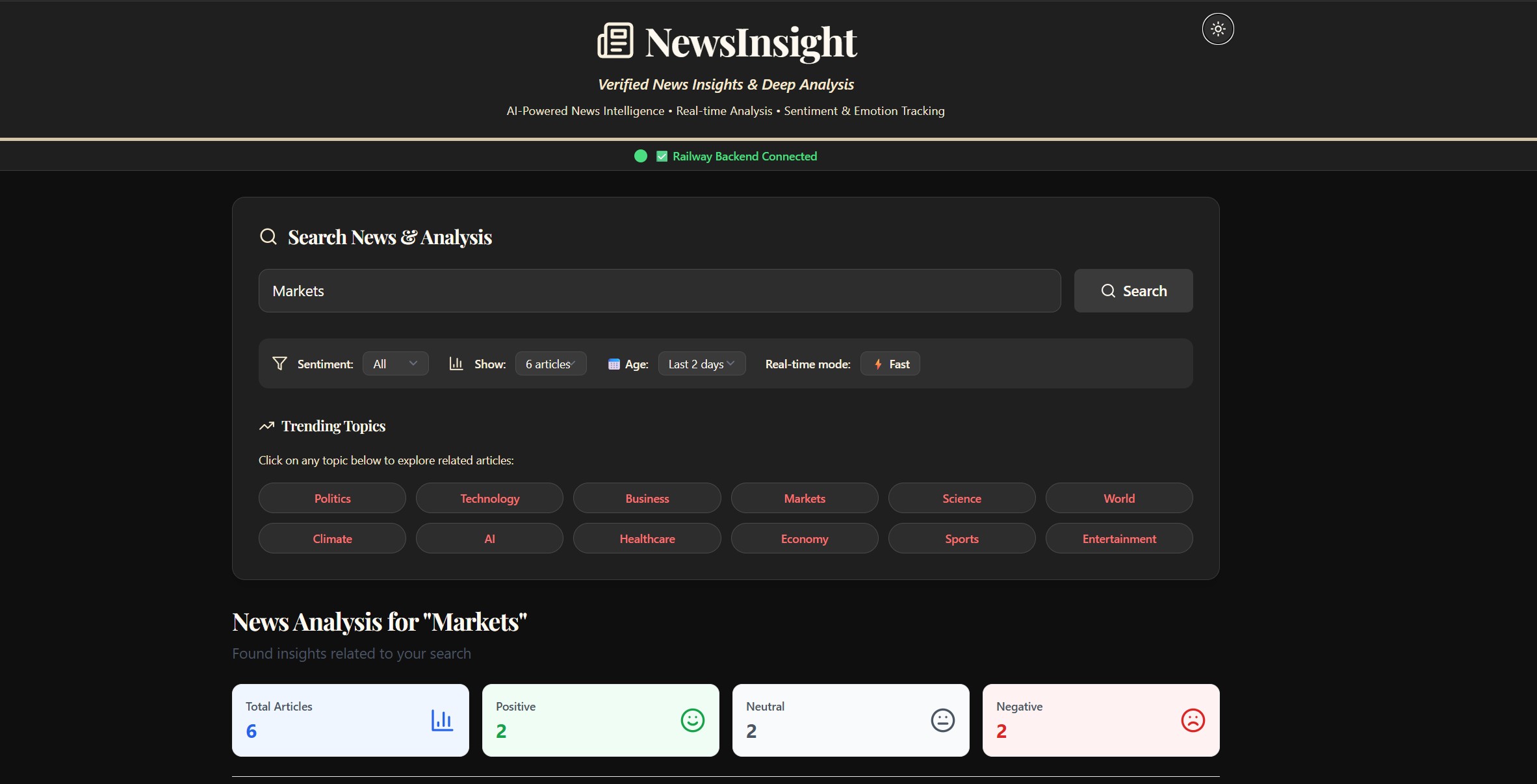
Issue 2: The “Flashbang” Effect
Problem: I love Dark Mode. But initially, when I refreshed the page, there was a split-second flash of the white theme before the dark theme kicked in. It felt unpolished and jarring—like a camera flash going off in your face.
Fix: The issue was timing. The app was rendering the default (light) state before checking the user’s preference. I moved the check to run immediately upon hydration, syncing with localStorage or the system preference before the user sees the UI.
// In ThemeContext.js
useEffect(() => {
  const savedTheme = localStorage.getItem('newsinsight-theme');
  const prefersDark = window.matchMedia('(prefers-color-scheme: dark)').matches;

  // Apply immediately to prevent the flash
  setIsDark(savedTheme ? savedTheme === 'dark' : prefersDark);
}, []);
Issue 3: Zombie Connections
Problem: Streaming data via SSE is great, but it introduced a memory leak. If a user typed “Apple,” started a stream, and then immediately typed “Tesla,” the first stream didn’t close. I had “zombie” connections running in the background, wasting resources and confusing the UI.
Fix: I implemented a system to track the current stream and force-close it before opening a new one.
// Keep track of the active pipe
const closeStream = searchArticlesStream(term, limit, onUpdate);
window.currentStream = closeStream;

// Kill existing stream before opening new one
if (window.currentStream) {
    window.currentStream();
}
Wrapping Up
That’s the frontend architecture of NewsInsight! In Part B, we’ll dive into the FastAPI backend and how it orchestrates the AI magic.
Check out the code: github.com/VineetLoyer/NewsInsight.ai