Part 2: FastAPI Backend Architecture
Overview
The NewsInsight backend is a FastAPI application deployed on Railway that serves as the bridge between the React frontend and AWS services (DynamoDB, S3, Bedrock). This blog covers the key engineering decisions around request handling, caching strategies, error management, and content filtering.
2.1 Request Logging & Observability
Design Philosophy
In a distributed system, debugging is a nightmare if you are staring at a wall of white text. I needed a way to glance at the Railway console and immediately understand the story of a request.
My solution? Emoji-based structured logging. It might sound trivial, but visually distinct logs save hours of debugging time.
Instead of standard print statements, I set up a system where every category of action has a visual indicator:
Implementation Pattern
# Structured logging with visual indicators
print(f"📡 Fetching from NewsAPI: {topic}")
print(f"📰 NewsAPI returned {len(articles)} articles")
print(f"⚡ Cache hit for '{topic}' - returning {len(cached_result['articles'])} cached articles")
print(f"🔄 Cache miss for '{topic}' - searching database")
print(f"❌ NewsAPI fetch failed: {e}")
print(f"✅ Stored article: {doc_id}")
Log Categories
| Emoji | Category | Purpose |
|---|---|---|
| 📡 | External API | Outbound requests to NewsAPI/Guardian |
| 📰 | Data Volume | Article counts and batch sizes |
| ⚡ | Cache | Cache hits for performance monitoring |
| 🔄 | Cache Miss | Database queries triggered |
| 📊 | Database | DynamoDB scan results |
| 🎯 | Search | Relevance scoring results |
| 💾 | Storage | Cache writes and persistence |
| ✅ | Success | Successful operations |
| ❌ | Error | Failed operations |
| ⚠️ | Warning | Non-critical issues |
Request Flow Logging
Every search request generates a traceable log sequence, I categorized the logs so I could scan them vertically. If I see a lot of red ❌s, I know something is critical. If I see a lot of lightning bolts ⚡, I know the cache is working efficiently.
[Request] GET /api/articles/search?query=AI&limit=6
📡 Fetching from NewsAPI: AI
📰 NewsAPI returned 20 articles
📊 Scanned 150 items from DynamoDB
🎯 Found 12 relevant items for 'AI' (entity-based search)
   Top matches: [('OpenAI announces GPT-5...', 18), ('AI regulation in EU...', 15)]
💾 Cached 6 articles for 'AI'
[Response] 200 OK - 6 articles returned
2.2 Error Handling Strategy
Layered Error Handling
One of the biggest lessons I’ve learned is that cloud services are flaky. Credentials might fail, APIs might time out, or DynamoDB might throttle requests.
I didn’t want the whole application to crash just because one part failed. I implemented a three-tier error handling strategy to ensure graceful degradation.
I came up with a three-tier error handling approach:
Tier 1: Graceful Degradation
I realized that if AWS credentials aren’t present (maybe I forgot to set the env var in Railway), the app shouldn’t refuse to start. Instead, it should start in a “crippled” mode but tell me exactly what’s wrong.
# AWS client initialization with fallback
try:
    aws_access_key = os.getenv("AWS_ACCESS_KEY_ID")
    aws_secret_key = os.getenv("AWS_SECRET_ACCESS_KEY")

    if aws_access_key and aws_secret_key:
        session = boto3.Session(
            aws_access_key_id=aws_access_key,
            aws_secret_access_key=aws_secret_key,
            region_name=AWS_REGION
        )
        print("🔑 Using AWS credentials from environment variables")
    else:
        session = boto3.Session(region_name=AWS_REGION)
        print("🔑 Using default AWS profile")

except Exception as e:
    print(f"⚠️ AWS initialization failed: {e}")
    if not DEBUG_MODE:
        table = None
        s3 = None
        bedrock = None
Tier 2: Operation-Level Try/Catch
When I actually run a function, like searching the database, I check if the connection exists first. If the database is down, I return an empty list rather than throwing a 500 Internal Server Error. This means the user sees “No articles found” instead of a broken page.
def search_articles_ddb(topic: Optional[str] = None, limit: int = 6) -> List[Dict]:
    if not table:
        print("⚠️ DynamoDB table not available")
        return []  # Return empty list, not error

    try:
        items = []
        resp = table.scan(Limit=200)
        items.extend(resp.get("Items", []) or [])
        # ... processing
        return result
    except Exception as e:
        print(f"❌ DDB scan error: {e}")
        return []  # Graceful degradation
Tier 3: HTTP Exception Handlers
If something totally unexpected happens, I have custom exception handlers to catch it and format the error nicely for the frontend.
@app.exception_handler(404)
async def not_found_handler(request, exc):
    return {"error": "Not found", "detail": str(exc)}

@app.exception_handler(500)
async def internal_error_handler(request, exc):
    return {"error": "Internal server error", "detail": "An unexpected error occurred"}
Error Response Patterns
| Scenario | Response | User Impact |
|---|---|---|
| DynamoDB unavailable | Empty array [] |
Shows “No articles found” |
| NewsAPI rate limited | Skip ingestion | Uses cached/existing data |
| Bedrock timeout | Fallback summary | Basic text truncation |
| Invalid date format | Current timestamp | Article still displays |
2.3 Smart Caching System
Architecture Overview
News data is interesting: it changes frequently, but popular topics (like “Politics” or “Technology”) are requested constantly. Querying DynamoDB for the same “AI” articles 100 times a minute is a waste of money and resources.
I decided to build an in-memory caching layer to sit between the API and the database.
I used a Python dictionary for the cache. It’s simple, fast, and perfect for this scale.
# Global cache state
_search_cache = {}
_cache_timestamp = datetime.utcnow()
_popular_topics = ["technology", "politics", "business", "science",
                   "health", "economy", "AI", "climate", "market", "innovation"]
Cache Key Generation
One challenge I faced was cache keys. If User A asks for “AI” with 6 articles, and then User B asks for “AI” with 12 articles, I can’t serve User B the cached result from User A—it’s too small.
So, I made the limit part of the unique key:
def get_cache_key(topic: str, limit: int) -> str:
    """Generate cache key for search results"""
    # Key becomes "ai:6" or "ai:12"
    return f"{topic.lower().strip()}:{limit}"
Cache Validity Logic
How long should news stay in the cache? I settled on 24 hours. Since I run a nightly ETL job at 2 AM to fetch new articles, keeping the cache for 24 hours ensures users always see the latest batch after the nightly update, while preventing reads during the day.
def is_cache_valid(cache_entry: dict) -> bool:
    """Check if cache entry is still valid (24 hours)"""
    if not cache_entry:
        return False

    cache_time = datetime.fromisoformat(cache_entry.get('timestamp', ''))
    age_hours = (datetime.utcnow() - cache_time).total_seconds() / 3600
    return age_hours < 24  # Cache valid for 24 hours
Cache Invalidation
def clear_search_cache():
    """Clear the search cache when new articles are added"""
    global _search_cache, _cache_timestamp
    _search_cache = {}
    _cache_timestamp = datetime.utcnow()
    print("🗑️ Search cache cleared")
Invalidation Triggers:
- New article stored via
_store_processed_article() - Manual refresh via
/api/articles/refreshendpoint - Bootstrap operation completes
Cache Flow Diagram
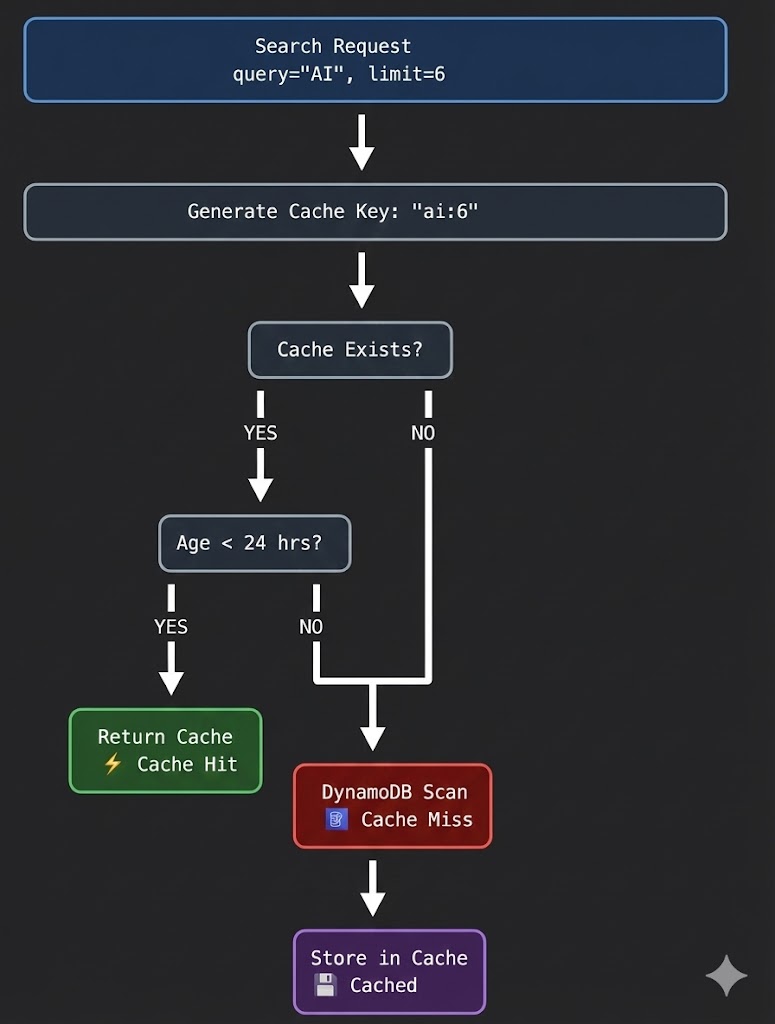
Prefetch Strategy for Popular Topics
Finally, I wanted the app to feel instant for new users. Since I know most people will click on the default topics like “Technology” or “Health,” I wrote a prefetch endpoint.
When the server starts (or via a cron job), I trigger this function to populate the cache immediately:
def should_prefetch_topic(topic: str) -> bool:
    """Determine if topic should be prefetched"""
    if not topic:
        return False

    topic_lower = topic.lower().strip()

    # Always prefetch popular topics
    if topic_lower in _popular_topics:
        return True

    # Prefetch if topic contains popular keywords
    return any(popular in topic_lower for popular in _popular_topics)
Prefetch Endpoint:
@app.post("/api/articles/prefetch")
async def prefetch_popular_topics():
    """Prefetch and cache popular topics for faster searches"""
    prefetched = []

    for topic in _popular_topics:
        articles = search_articles_ddb(topic, 6, use_cache=True)
        prefetched.append({"topic": topic, "cached_articles": len(articles)})

    return {
        "message": f"Prefetched {len(prefetched)} popular topics",
        "topics": prefetched,
        "cache_size": len(_search_cache)
    }
2.4 Content Filtering System
Multi-Layer Filtering Architecture
Building a news aggregator taught me one thing very quickly: “Garbage In, Garbage Out.”
APIs like NewsAPI are fantastic, but they are also noisy. They return press releases, 200-word clickbait, and sometimes just pure spam. I didn’t want my users wading through that, and I definitely didn’t want to pay to store it.
So, I built a defense-in-depth filtering system (content_filter.py). Think of it like a series of sieves: the coarse sieve catches the rocks (spam), and the fine sieve catches the sand (low-quality writing).
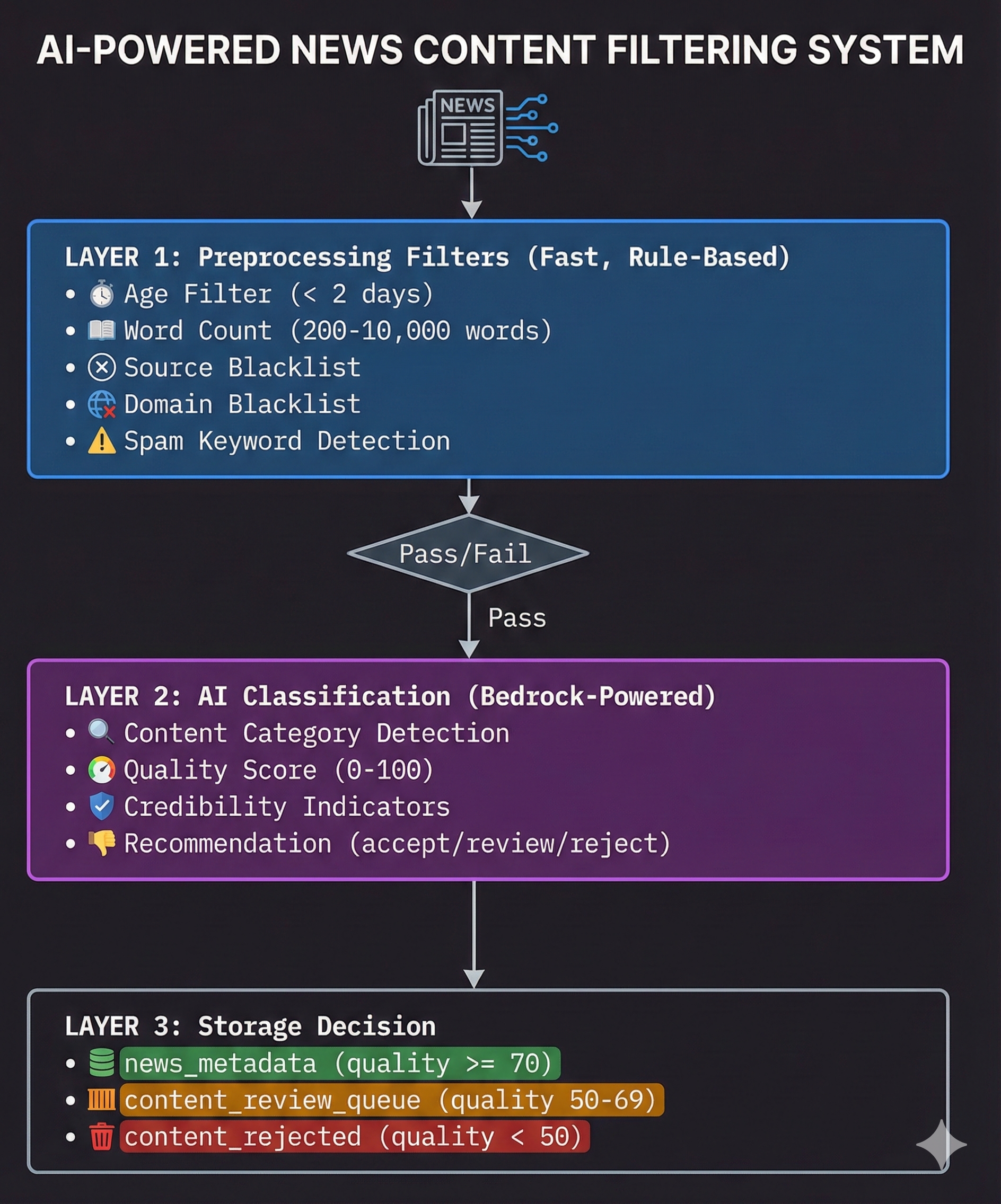
Layer 1: Preprocessing Filters
Before I even think about sending an article to an AI model (which costs money), I run it through a set of hard rules. If an article fails these, it gets dropped immediately.
class ContentFilter:
    def __init__(self, session: boto3.Session):
        self.ddb = session.resource("dynamodb")
        self.blacklist_table = self.ddb.Table("content_blacklist")

        # Content quality thresholds
        self.MIN_WORDS = 200
        self.MAX_WORDS = 10000
        self.MIN_QUALITY_SCORE = 70

        # Known low-quality indicators
        self.SPAM_KEYWORDS = [
            "click here", "limited time", "act now", "free trial",
            "make money", "work from home", "get rich", "miracle cure"
        ]

        self.AD_INDICATORS = [
            "sponsored", "advertisement", "promoted", "paid content",
            "affiliate", "partner content", "brand story"
        ]
I made a controversial decision here: If an article is older than 2 days, I reject it.
Age Filter Implementation:
def _check_article_age(self, article: Dict) -> Tuple[bool, str]:
    """Check if article is within acceptable age limit (2 days)"""
    MAX_AGE_DAYS = 2

    article_date_str = article.get("date") or article.get("publishedAt")

    if not article_date_str:
        return False, "No publication date found"

    article_date = self._parse_article_date(article_date_str)
    if not article_date:
        return False, f"Invalid date format: {article_date_str}"

    age_delta = datetime.utcnow() - article_date
    age_days = age_delta.total_seconds() / (24 * 3600)

    if age_days > MAX_AGE_DAYS:
        return False, f"Too old: {age_days:.1f} days (max: {MAX_AGE_DAYS} days)"

    return True, f"Recent: {age_days:.1f} days old"
Why such a tight window?
-
Relevance: My app is about current events. Old news is history.
-
Cost: Storage isn’t free. I’d rather store 1,000 fresh articles than 10,000 stale ones.
-
Hygiene: My nightly ETL job cleans up old data anyway. There is no point letting it in just to delete it later.
Blacklist System
Some domains are just never going to provide the value I want. I set up a DynamoDB table specifically to ban bad actors.
# DynamoDB table structure
{
    "type": "source",      # HASH key
    "value": "buzzfeed",   # RANGE key
    "reason": "Entertainment/satire",
    "added_date": "2024-01-15T10:30:00Z",
    "added_by": "system"
}
Initial Blacklist Categories:
INITIAL_BLACKLIST = {
    "sources": [
        "buzzfeed", "clickhole", "theonion", "babylonbee",  # Satire
        "infowars", "breitbart", "naturalnews",  # Low credibility
        "taboola", "outbrain", "revcontent"  # Ad networks
    ],
    "domains": [
        "ads.yahoo.com", "googleads.com", "doubleclick.net",
        "facebook.com/tr", "analytics.google.com"
    ],
    "keywords": [
        "sponsored content", "paid promotion", "advertisement"
    ]
}
This allows me to ban a source dynamically without redeploying the code—I just add an item to DynamoDB.
Layer 2: AI-Powered Classification
Once an article passes the basic checks, I bring in the heavy artillery: AWS Bedrock.
Regular expression matching can’t detect “clickbait” or “opinion pieces” reliably. LLMs excel at this. I treat the LLM as an editor, asking it to grade the article.
def ai_classify_content(self, article: Dict, bedrock_client) -> Dict:
    """AI-powered content classification using AWS Bedrock"""

    classification_prompt = f"""
    Analyze this article and provide a JSON response:

    {{
        "category": "news_article|advertisement|opinion_piece|press_release|clickbait|spam",
        "quality_score": 0-100,
        "credibility_indicators": {{
            "has_sources": true/false,
            "has_quotes": true/false,
            "factual_tone": true/false,
            "proper_attribution": true/false
        }},
        "content_flags": ["promotional_language", "sensationalized_headline", ...],
        "recommendation": "accept|review|reject",
        "reasoning": "Brief explanation"
    }}

    Article Title: {article.get('headline', '')}
    Article Content: {content[:2000]}
    """
Quality Score Breakdown:
| Score Range | Classification | Action |
|---|---|---|
| 70-100 | High Quality | Store in news_metadata |
| 50-69 | Medium Quality | Queue for human review |
| 0-49 | Low Quality | Reject (log for analysis) |
Layer 3: Storage Decision
This is where the rubber meets the road. Based on the AI’s score, I route the data to different storage destinations.
def should_store_article(self, classification: Dict) -> Tuple[str, str]:
    """Determine storage destination based on classification"""

    quality_score = classification.get("quality_score", 0)
    category = classification.get("category", "unknown")
    recommendation = classification.get("recommendation", "review")

    # High quality - store in main database
    if quality_score >= 70 and category == "news_article" and recommendation == "accept":
        return "news_metadata", "High quality news article"

    # Medium quality - queue for review
    elif quality_score >= 50 and recommendation in ["accept", "review"]:
        return "content_review_queue", "Needs human review"

    # Low quality - reject
    else:
        return "content_rejected", f"Low quality: {classification.get('reasoning')}"
Integration with Backend
# In backend.py - Content filter initialization
content_filter = None
if ContentFilter:
    try:
        content_filter = ContentFilter(session)
        print("✅ Content filtering system initialized")
    except Exception as e:
        print(f"⚠️ Content filter initialization failed: {e}")
        print("   Continuing without content filtering...")
Graceful Degradation: If content filtering fails to initialize, the system continues without it rather than blocking all article ingestion.
Filtering Statistics
If you filter silently, you’ll never know if you’re blocking good content by mistake. I added a detailed summary log that runs after every ingestion cycle.
It looks like this in my logs:
def ingest_topic_with_filtering(topic: str, content_filter: ContentFilter) -> Dict[str, int]:
    """Enhanced ingestion with comprehensive content filtering"""

    stats = {
        "fetched": 0,
        "age_rejected": 0,
        "word_count_rejected": 0,
        "blacklist_rejected": 0,
        "spam_rejected": 0,
        "ai_rejected": 0,
        "processed": 0,
        "stored": 0
    }

    # ... processing logic ...

    # Print summary
    print(f"📊 Ingestion Summary for '{topic}':")
    print(f"   📥 Fetched: {stats['fetched']}")
    print(f"   🕒 Age rejected: {stats['age_rejected']} ({stats['age_rejected']/stats['fetched']*100:.1f}%)")
    print(f"   📝 Word count rejected: {stats['word_count_rejected']}")
    print(f"   🚫 Blacklist rejected: {stats['blacklist_rejected']}")
    print(f"   🗑️ Spam rejected: {stats['spam_rejected']}")
    print(f"   🤖 AI rejected: {stats['ai_rejected']}")
    print(f"   ✅ Processed: {stats['processed']}")
    print(f"   💾 Stored: {stats['stored']}")

    return stats
2.5 Entity-Based Search Relevance
Problem Statement
Standard string matching is dumb. If I search for “AI”, a standard string.contains() check might miss a brilliant article about “Machine Learning” or “LLMs” just because it doesn’t use the exact two letters “A” and “I”.
I didn’t want a dumb search. I wanted a relevant search.
My Solution: Weighted Scoring I built a custom scoring engine that ranks articles based on where the keyword appears. I decided that a match in the Entity list (which AWS Bedrock extracts for me) is far more important than a passing mention in the summary.
Here is the hierarchy I came up with:
def calculate_relevance_score(item):
    """Calculate relevance score for ranking"""
    score = 0

    # Check entities (highest priority - 10 points)
    entities = item.get("entities", [])
    if isinstance(entities, list):
        for entity in entities:
            entity_text = ""
            if isinstance(entity, dict):
                entity_text = (entity.get("text") or "").lower()
            elif isinstance(entity, str):
                entity_text = entity.lower()

            if t_lower in entity_text or entity_text in t_lower:
                score += 10  # Exact entity match
            elif any(word in entity_text for word in t_lower.split()):
                score += 5   # Partial entity match

    # Check headline (medium priority - 8 points)
    headline = (item.get("headline") or "").lower()
    if t_lower in headline:
        score += 8
    elif any(word in headline for word in t_lower.split()):
        score += 3

    # Check summary (lower priority - 4 points)
    summary = (item.get("summary") or "").lower()
    if t_lower in summary:
        score += 4
    elif any(word in summary for word in t_lower.split()):
        score += 1

    return score
Scoring Weights Rationale
| Field | Exact Match | Partial Match | Rationale |
|---|---|---|---|
| Entities | 10 | 5 | AI-extracted entities are most semantically relevant |
| Headline | 8 | 3 | Headlines are curated by editors for relevance |
| Summary | 4 | 1 | Summaries may contain tangential mentions |
When users search, I calculate this score for every potential match, sort by score (descending), and use the publication date as a tie-breaker. This ensures that the most relevant and recent news always floats to the top.
Search Result Ranking
# Calculate scores and filter
scored_items = []
for item in items:
    score = calculate_relevance_score(item)
    if score > 0:  # Only include items with some relevance
        scored_items.append((item, score))

# Sort by relevance score (descending) then by date
scored_items.sort(
    key=lambda x: (x[1], _to_dt(x[0].get("date", "")) or datetime.min),
    reverse=True
)
Tie-Breaking: When two articles have the same relevance score, newer articles rank higher.
2.6 API Endpoint Reference
I designed the API to be the “Command Center” for the application. While the users mostly hit the search endpoints, I built a suite of admin endpoints for myself to manage the data without needing to SSH into a database.
Core Endpoints
| Endpoint | Method | Purpose |
|---|---|---|
/api/articles/search |
GET | Search with smart caching |
/api/articles/search-stream |
GET | SSE streaming search |
/api/articles/explain |
POST | AI article analysis |
/api/articles/chat |
POST | Conversational Q&A |
/api/articles/ingest |
POST | Manual topic ingestion |
/api/articles/bootstrap |
POST | Initial data population |
/api/articles/prefetch |
POST | Cache warming |
/api/articles/refresh |
POST | Cache invalidation |
Administrative Endpoints
| Endpoint | Method | Purpose |
|---|---|---|
/api/status |
GET | System health check |
/api/articles/debug |
GET | Debug article data |
/api/health |
GET | Simple health probe |
2.7 Deployment Configuration
I deployed the backend to Railway because it makes containerization painless. But the transition from localhost to the cloud wasn’t seamless.
Railway Setup
Procfile:
web: uvicorn backend:app --host 0.0.0.0 --port $PORT --log-level info
Environment Variables:
AWS_REGION=us-west-2
AWS_ACCESS_KEY_ID=***
AWS_SECRET_ACCESS_KEY=***
DDB_TABLE=news_metadata
PROC_BUCKET=newsinsight-processed
BEDROCK_MODEL_ID=anthropic.claude-3-haiku-20240307-v1:0
NEWSAPI_KEY=***
GUARDIAN_KEY=***
CORS Configuration
If you’ve ever built a frontend-backend split, you know the pain of Cross-Origin Resource Sharing (CORS). My Vercel frontend was getting blocked by my Railway backend.
I had to explicitly whitelist my domains. Note that I included localhost for dev and the Vercel wildcard *.vercel.app so I can preview pull requests without changing backend code.
app.add_middleware(
    CORSMiddleware,
    allow_origins=[
        # Local development
        "http://localhost:3000",
        "http://localhost:3001",
        "http://localhost:3002",
        # Production
        "https://news-insight-ai-tawny.vercel.app",
        "https://*.vercel.app",  # Preview deployments
    ],
    allow_credentials=True,
    allow_methods=["*"],
    allow_headers=["*"],
)
2.8 Issues Encountered & Resolutions
Issue 1: DynamoDB Decimal Serialization
Problem: DynamoDB stores numbers as a special Decimal type. When I tried to return these directly to the frontend, Python’s JSON encoder crashed because it doesn’t know how to serialize Decimal.
Solution: I wrote a recursive helper function that scans every response and converts Decimal to float or int before it leaves the API.
def format_article(article: Dict[str, Any]) -> Dict[str, Any]:
    def convert_decimal(obj):
        if isinstance(obj, Decimal):
            return float(obj)
        return obj

    formatted = {}
    for key, value in article.items():
        if isinstance(value, dict):
            formatted[key] = {k: convert_decimal(v) for k, v in value.items()}
        else:
            formatted[key] = convert_decimal(value)
    return formatted
Issue 2: Cache Stale After Ingestion
Problem: I would ingest new articles, but they wouldn’t show up in search. I thought the DB write failed. The Reality: The database was fine! My caching layer was doing its job too well. It was serving the old “empty” search result it had cached 5 minutes ago. Solution: I added a trigger to clear_search_cache() immediately after any write operation.
def _store_processed_article(article, analysis):
    # ... store logic ...
    table.put_item(Item=item)
    clear_search_cache()  # Invalidate cache
Issue 3: SSE Connection Drops
Problem: Streaming responses disconnecting prematurely Solution: Proper headers for SSE
return StreamingResponse(
    generate_stream(),
    media_type="text/event-stream",
    headers={
        "Cache-Control": "no-cache",
        "Connection": "keep-alive",
        "Access-Control-Allow-Origin": "*",
    }
)
Wrapping Up
This backend is the workhorse of NewsInsight. It handles the dirty work of data cleaning, caching, and searching so the frontend can look pretty and the AI can sound smart.
That’s the backend architecture of NewsInsight! In Part C, we’ll dive into the AWS Bedrock. We will look at how I engineered the prompts to turn raw text into structured insights.
Check out the code: github.com/VineetLoyer/NewsInsight.ai