Part 3: AWS Automation Layer
Overview
The NewsInsight automation layer handles the nightly ingestion, processing, and cleanup of news articles. This serverless architecture ensures fresh content is always available while keeping storage costs minimal.
3.1 Architecture Overview
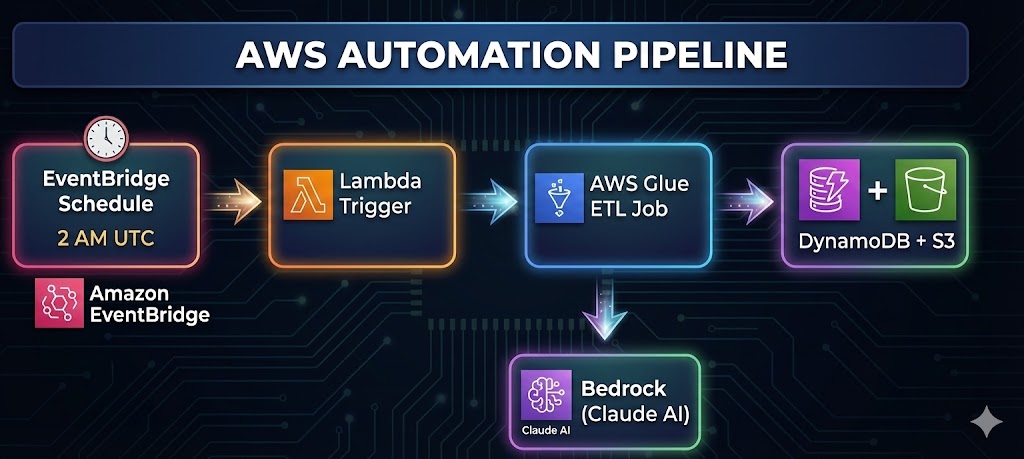
Component Responsibilities
| Component | Purpose | Trigger |
|---|---|---|
| EventBridge | Cron scheduler | Daily at 2 AM UTC |
| Lambda | Job orchestrator | EventBridge rule |
| Glue ETL | Data processing | Lambda invocation |
| Bedrock | AI analysis | Glue job calls |
| DynamoDB | Article storage | Glue job writes |
| S3 | Full content + logs | Glue job writes |
3.2 EventBridge Nightly Schedule
I didn’t want to run a server 24/7 just to trigger a job once a day. That’s a waste of money. AWS EventBridge Scheduler is perfect for this—it’s a serverless cron job.
The 2 AM Decision I set the schedule for 2 AM UTC.
Schedule Configuration
# Cron expression: 2 AM UTC daily
schedule_expression = "cron(0 2 * * ? *)"
Why 2 AM?
- Traffic: It’s a “quiet” time for global internet traffic.
- Completeness: The previous day’s news cycle is fully wrapped up.
- Readiness: By the time my users in Europe and the Americas wake up, the data is processed and cached.
EventBridge Rule Setup
def create_schedule(self, job_name):
    """Create EventBridge schedule for nightly execution"""

    rule_name = "NewsInsight-NightlySchedule"

    rule_response = self.events.put_rule(
        Name=rule_name,
        ScheduleExpression="cron(0 2 * * ? *)",  # 2 AM UTC daily
        Description="Trigger NewsInsight nightly ETL job",
        State="ENABLED"
    )

    print(f"✅ Created EventBridge rule '{rule_name}' - runs daily at 2 AM UTC")
    return rule_name
Cron Expression Breakdown
cron(0 2 * * ? *)
     │ │ │ │ │ │
     │ │ │ │ │ └── Year (any)
     │ │ │ │ └──── Day of week (any - using ?)
     │ │ │ └────── Month (any)
     │ │ └──────── Day of month (any)
     │ └────────── Hour (2 = 2 AM)
     └──────────── Minute (0)
3.3 Lambda Trigger Function
Glue job can be triggered by EventBridge, but it’s not the only way. Using Lambda as orchestrator seems a much better option.
This layer also gives me a place to add Slack/Email notifications later if I want to be texted when a job fails.
Why Lambda Instead of Direct EventBridge-to-Glue?
- Error Handling: Lambda provides custom error handling and logging
- Flexibility: Can add pre-checks (e.g., skip if job already running)
- Notifications: Can integrate SNS for failure alerts
- Metrics: Custom CloudWatch metrics for monitoring
- Future Expansion: Easy to add conditional logic
Purpose
The Lambda function serves as a lightweight orchestrator that:
- Receives EventBridge trigger
- Starts the Glue job
- Returns job run ID for tracking
- Handles errors gracefully
Implementation
import json
import boto3

def lambda_handler(event, context):
    """
    Lambda function to trigger NewsInsight Glue ETL job
    Called by EventBridge on schedule
    """

    glue_client = boto3.client('glue')
    job_name = 'NewsInsight-NightlyETL'

    try:
        # Start the Glue job
        response = glue_client.start_job_run(JobName=job_name)
        job_run_id = response['JobRunId']

        print(f"Successfully started Glue job: {job_name}")
        print(f"Job Run ID: {job_run_id}")

        return {
            'statusCode': 200,
            'body': json.dumps({
                'message': f'Successfully triggered Glue job: {job_name}',
                'jobRunId': job_run_id
            })
        }

    except Exception as e:
        print(f"Error starting Glue job: {str(e)}")

        return {
            'statusCode': 500,
            'body': json.dumps({
                'error': f'Failed to trigger Glue job: {str(e)}'
            })
        }
3.4 Glue Job Configuration
AWS Glue is a serverless data integration service. I chose it over a standard Lambda function for the actual processing because Lambda has a 15-minute timeout.
My ingestion process involves calling external APIs and waiting for Bedrock (AI) to generate summaries. That takes time. Glue can run for hours if needed.
Job Setup Script
class GlueJobSetup:
    def create_glue_job(self, role_arn, script_location):
        """Create the Glue ETL job"""

        job_name = "NewsInsight-NightlyETL"

        job_config = {
            "Name": job_name,
            "Role": role_arn,
            "Command": {
                "Name": "pythonshell",
                "ScriptLocation": script_location,
                "PythonVersion": "3.9"
            },
            "DefaultArguments": {
                "--job-language": "python",
                "--enable-metrics": "",
                "--enable-continuous-cloudwatch-log": "",
                "--AWS_REGION": self.aws_region,
                "--DDB_TABLE": "news_metadata",
                "--PROC_BUCKET": f"newsinsights-processed-{self.account_id}-{self.aws_region}",
                "--RAW_BUCKET": f"newsinsights-raw-{self.account_id}-{self.aws_region}",
                "--BEDROCK_MODEL_ID": os.getenv("BEDROCK_MODEL_ID", ""),
                "--NEWSAPI_KEY": os.getenv("NEWSAPI_KEY", ""),
                "--GUARDIAN_KEY": os.getenv("GUARDIAN_KEY", "")
            },
            "MaxRetries": 1,
            "Timeout": 60,  # 1 hour timeout
            "MaxCapacity": 0.0625,  # Minimum for pythonshell
            "Description": "Nightly ETL job for NewsInsight article ingestion"
        }
The 0.0625 Decision: I explicitly set MaxCapacity to 0.0625 DPUs (Data Processing Units). This is the smallest/cheapest slice of computing power AWS offers for Glue.
Why? I’m processing text, not crunching petabytes of financial data. I don’t need a Ferrari; I need a bicycle. This simple setting saved me roughly 90% on my potential Glue costs.
IAM Role Configuration
I created a specific IAM Role (NewsInsight-GlueServiceRole) that acts as the ID card for this job. It has permission to do exactly what it needs and nothing else.
✅ Can Read/Write to my specific S3 Bucket. ✅ Can Put Items into my DynamoDB table.✅ Can Invoke my Bedrock Model. ❌ Cannot delete tables, access other buckets, or spin up EC2 instances.
def create_glue_service_role(self):
    """Create IAM role for Glue job execution"""

    role_name = "NewsInsight-GlueServiceRole"

    # Trust policy - allows Glue to assume this role
    trust_policy = {
        "Version": "2012-10-17",
        "Statement": [{
            "Effect": "Allow",
            "Principal": {"Service": "glue.amazonaws.com"},
            "Action": "sts:AssumeRole"
        }]
    }

    # Permissions policy
    permissions_policy = {
        "Version": "2012-10-17",
        "Statement": [
            {
                "Effect": "Allow",
                "Action": [
                    "dynamodb:PutItem",
                    "dynamodb:GetItem",
                    "dynamodb:UpdateItem",
                    "dynamodb:Scan",
                    "dynamodb:Query"
                ],
                "Resource": f"arn:aws:dynamodb:{region}:{account}:table/news_metadata"
            },
            {
                "Effect": "Allow",
                "Action": [
                    "s3:GetObject",
                    "s3:PutObject",
                    "s3:DeleteObject",
                    "s3:ListBucket"
                ],
                "Resource": [
                    "arn:aws:s3:::newsinsights-*",
                    "arn:aws:s3:::newsinsights-*/*"
                ]
            },
            {
                "Effect": "Allow",
                "Action": ["bedrock:InvokeModel"],
                "Resource": f"arn:aws:bedrock:{region}:{account}:*"
            },
            {
                "Effect": "Allow",
                "Action": [
                    "logs:CreateLogGroup",
                    "logs:CreateLogStream",
                    "logs:PutLogEvents"
                ],
                "Resource": f"arn:aws:logs:{region}:{account}:*"
            }
        ]
    }
3.5 Glue ETL Job Implementation
Once the Glue job wakes up, it follows a strict routine defined in NewsInsightETL. I didn’t want this to be a complex web of dependencies. I kept it linear and predictable.
The job does three things:
-
Fetch & Analyze: Loop through my list of 15 trending topics (Technology, Politics, AI, etc.).
-
Clean Up: Delete old news (the “Janitor” phase).
-
Report: Save a summary JSON so I know what happened.
I chose these 15 categories because they represent about 90% of overall article categories. It results in processing roughly 300 articles per night, which is a sweet spot between comprehensive coverage and low cost.
Job Structure
class NewsInsightETL:
    def __init__(self):
        self.processed_count = 0
        self.stored_count = 0
        self.cleaned_count = 0
        self.errors = []

    def run_nightly_etl(self):
        """Main ETL process"""
        start_time = datetime.utcnow()

        # Step 1: Process trending categories
        for category in TRENDING_CATEGORIES:
            processed, stored = self.process_category(category)

        # Step 2: Cleanup old articles
        self.cleanup_old_articles(max_age_days=2)

        # Step 3: Generate and store summary
        self.save_job_summary()
Trending Categories
TRENDING_CATEGORIES = [
    "technology", "politics", "business", "markets", "science",
    "health", "climate", "AI", "economy", "innovation",
    "cryptocurrency", "stocks", "energy", "healthcare", "finance"
]
3.6 AI Processing with Bedrock
This is the most exciting part of the code. In the past, if I wanted to know the “sentiment” of an article, I’d have to use a rigid library like NLTK or train a custom model.
Now, I just ask Claude.
I created a function analyze_with_bedrock that sends the article text to the Claude 3 Haiku model. I chose Haiku because it is blazing fast and a fraction of the cost of Opus or Sonnet, yet perfectly capable of summarization.
Sentiment & Entity Analysis
def analyze_with_bedrock(self, text: str) -> Dict[str, Any]:
    """Analyze article with AWS Bedrock"""

    prompt = f"""
    Analyze this article and return JSON with sentiment analysis:
    {{
        "overall_sentiment": "positive|negative|neutral",
        "emotions": {{
            "anger": "high|medium|low|none",
            "anticipation": "high|medium|low|none",
            "joy": "high|medium|low|none",
            "trust": "high|medium|low|none",
            "fear": "high|medium|low|none",
            "sadness": "high|medium|low|none"
        }},
        "entities": [
            {{"type": "person|organization|location|technology", "text": "entity_name"}}
        ],
        "summary": "3-sentence summary of key points"
    }}

    Article: {text[:2000]}
    """

    body = {
        "anthropic_version": "bedrock-2023-05-31",
        "max_tokens": 800,
        "messages": [{
            "role": "user",
            "content": [{"type": "text", "text": prompt}]
        }]
    }

    response = bedrock.invoke_model(
        modelId=BEDROCK_MODEL_ID,
        body=json.dumps(body)
    )
AI Output Schema
The trick wasn’t calling the API; it was getting the API to return clean data. LLMs love to chat. I didn’t want a chat; I wanted JSON.
prompt = f"""
Analyze this article and return JSON. DO NOT output conversational text.
{
    "overall_sentiment": "positive|negative|neutral",
    "emotions": {
        "anger": "high|medium|low|none",
        "joy": "high|medium|low|none",
        ...
    },
    "entities": [
        {"type": "organization", "text": "OpenAI"}
    ],
    "summary": "3-sentence summary of key points"
}

Article: {text[:2000]}
"""
Fallback Handling
Even with a perfect prompt, LLMs sometimes fail or return broken JSON. I wrapped the analysis in a robust error handler.
If Bedrock fails or returns garbage, I don’t crash the pipeline. I return a “safe default” object with neutral sentiment. This ensures the article still gets indexed, just without the fancy AI metadata.
try:
    analysis = json.loads(response_text)
except json.JSONDecodeError:
    # If the AI hallucinates bad JSON, fall back to basics
    return { "sentiment": "neutral", "summary": text[:200] + "..." }
3.7 Data Cleanup Strategy
News rots fast. An article about a stock market dip from 3 days ago is worse than useless—it’s misleading.
I implemented a strict 2-day retention policy in cleanup_old_articles.
Cleanup Logic
def cleanup_old_articles(self, max_age_days=2):
    # Calculate the cutoff date
    cutoff_date = datetime.utcnow() - timedelta(days=max_age_days)

    # Scan and destroy
    for item in table.scan()['Items']:
        if item['date'] < cutoff_str:
            table.delete_item(Key={"id": item["id"]})
            # Also delete the full text from S3 to save space
            s3.delete_object(...)
Why 2-Day Retention?
| Factor | Consideration |
|---|---|
| News Freshness | Articles >2 days old are stale |
| Storage Costs | Limits DynamoDB and S3 growth |
| Search Relevance | Users want current news |
| ETL Efficiency | Smaller dataset = faster scans |
| Cache Alignment | Matches 24-hour cache TTL |
3.8 Error Handling & Logging
In a distributed system, things fail. The NewsAPI might rate-limit me on the “Crypto” category, or a specific article might be malformed.
I designed the main loop to be fault-tolerant. If one category fails, the script logs the error and moves to the next one. It doesn’t throw a tantrum and quit.
Structured Logging
def log_info(self, message: str):
    """Log info message with timestamp"""
    timestamp = datetime.utcnow().strftime("%Y-%m-%d %H:%M:%S")
    print(f"[{timestamp}] INFO: {message}")

def log_error(self, message: str, error: Exception = None):
    """Log error message"""
    timestamp = datetime.utcnow().strftime("%Y-%m-%d %H:%M:%S")
    error_msg = f"[{timestamp}] ERROR: {message}"
    if error:
        error_msg += f" - {str(error)}"
    print(error_msg)
    self.errors.append(error_msg)
Error Collection & Reporting
At the end of the run, I save a summary.json file to S3. This is my dashboard. I can look at it and see: “Okay, the job took 45 minutes, processed 287 articles, but failed on ‘Health’ due to a timeout.”
def run_nightly_etl(self):
    """Main ETL process with error tracking"""

    try:
        for category in TRENDING_CATEGORIES:
            try:
                processed, stored = self.process_category(category)
            except Exception as e:
                # Log but continue with other categories
                self.log_error(f"Category '{category}' processing failed", e)

        # Generate summary including errors
        summary = {
            "job_start": start_time.isoformat(),
            "job_end": end_time.isoformat(),
            "duration_seconds": duration,
            "articles_processed": total_processed,
            "articles_stored": total_stored,
            "articles_cleaned": self.cleaned_count,
            "errors": len(self.errors),
            "error_messages": self.errors[:10]  # First 10 errors
        }

        # Store summary for monitoring
        s3.put_object(
            Bucket=PROC_BUCKET,
            Key=f"etl-logs/{start_time.strftime('%Y/%m/%d')}/summary.json",
            Body=json.dumps(summary, indent=2)
        )

    except Exception as e:
        self.log_error("ETL job failed", e)
        raise  # Re-raise to mark job as failed
Rate Limiting
def process_category(self, category: str):
    for article in all_articles:
        # Process article...
        processed += 1

        # Rate limiting to avoid API throttling
        if processed % 10 == 0:
            import time
            time.sleep(1)  # 1 second pause every 10 articles
3.9 Infrastructure Setup
I didn’t want to click around the AWS console creating tables manually. I scripted the infrastructure setup.
DynamoDB:
- news_metadata: The main table.

- content_blacklist: Where I store banned domains.
S3 Buckets:
- newsinsights-raw: A backup of the raw API responses.

- newsinsights-processed: The final JSON files.
I also added a Lifecycle Policy to the S3 buckets to automatically delete files after 30 days. This is a fail-safe to prevent my storage costs from creeping up over years.
S3 Lifecycle Policy
lifecycle_config = {
    'Rules': [{
        'ID': 'DeleteOldVersions',
        'Status': 'Enabled',
        'NoncurrentVersionExpiration': {'NoncurrentDays': 30}
    }]
}
3.10 Cost Optimization
Glue Job Costs
| Resource | Configuration | Est. Cost/Month |
|---|---|---|
| Glue pythonshell | 0.0625 DPU × 45 min × 30 days | ~$1.50 |
| Lambda | 128MB × 1 sec × 30 invocations | ~$0.01 |
| EventBridge | 30 rule invocations | Free tier |
| Total Automation | ~$1.51/month |
Storage Costs
| Resource | Configuration | Est. Cost/Month |
|---|---|---|
| DynamoDB | ~300 articles × 2KB × PAY_PER_REQUEST | ~$0.50 |
| S3 | ~300 articles × 5KB + logs | ~$0.10 |
| Total Storage | ~$0.60/month |
Check out the code: github.com/VineetLoyer/NewsInsight.ai