Part 4: AI Agent Layer
Overview
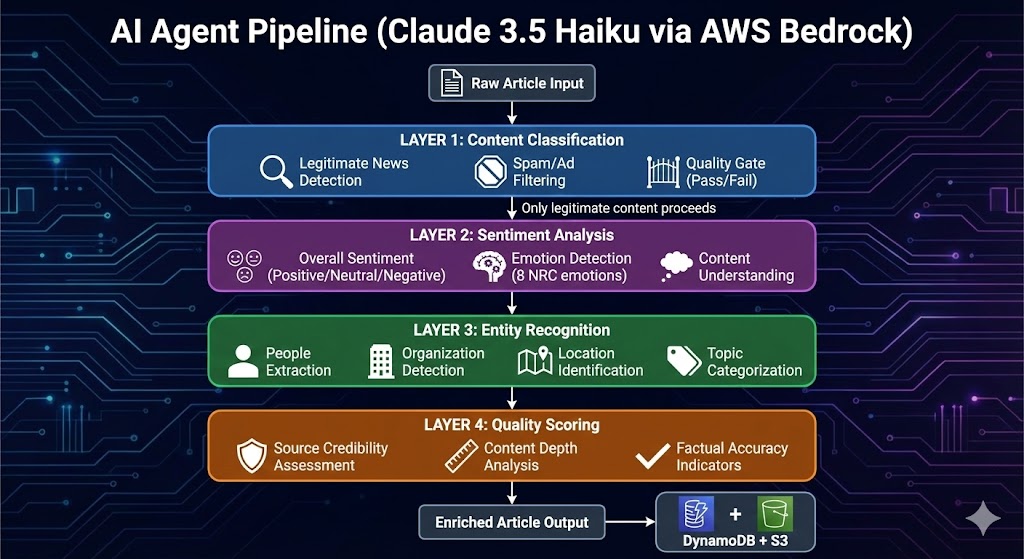
I designed the AI Agent Layer as the intelligence backbone of NewsInsight. This layer processes every article through a multi-stage pipeline using AWS Bedrock with Claude 3.5 Haiku as the foundation model. The architecture I built handles four critical functions: content classification, sentiment analysis, entity recognition, and quality scoring.
4.1 Architecture Philosophy
When I architected this system, I faced a core challenge: how do I ensure only high-quality, legitimate news content reaches users while extracting maximum intelligence from each article? My solution was a four-layer AI pipeline where each layer serves a distinct purpose and feeds into the next.
Why Claude 3.5 Haiku?
Choosing an LLM in 2024 is like choosing a JavaScript framework—there are too many options, and everyone has a strong opinion.
I looked at GPT-4o, Claude 3.5 Sonnet, and Llama 3 via Bedrock. I settled on Claude 3.5 Haiku for one specific reason: It is the “Honda Civic” of LLMs.
I chose Claude 3.5 Haiku for several strategic reasons:
| Factor | Decision Rationale |
|---|---|
| Speed | Haiku processes requests in ~200-400ms, critical for real-time ingestion |
| Cost | At $0.25/1M input tokens, I can process ~300 articles/night for pennies |
| JSON Reliability | Claude excels at structured JSON output, reducing parsing failures |
| Context Window | 200K tokens allows processing full articles without truncation |
| Reasoning Quality | Despite being the “smallest” Claude, Haiku handles classification tasks exceptionally well |
4.2 Layer 1: Content Classification
The Problem I Solved
The biggest lesson I learned working with News APIs is that they are noisy. They return everything: press releases, 200-word clickbait, opinion pieces ranting about nothing, and sometimes just pure ads disguised as articles.
I needed a bouncer.
Input Signal
I didn’t just ask the AI “Is this good?”. That’s too vague. I engineered a prompt that forces the model to act like a cynical newspaper editor.
classification_prompt = f"""
Analyze this article and provide a JSON response with content classification:

{{
    "category": "news_article|advertisement|opinion_piece|press_release|clickbait|duplicate|low_quality|spam",
    "quality_score": 0-100,
    "credibility_indicators": {{
        "has_sources": true/false,
        "has_quotes": true/false,
        "factual_tone": true/false,
        "proper_attribution": true/false
    }},
    "content_flags": [
        "promotional_language",
        "sensationalized_headline",
        "missing_attribution",
        "poor_grammar",
        "duplicate_content"
    ],
    "recommendation": "accept|review|reject",
    "reasoning": "Brief explanation of classification"
}}

Article Title: {article.get('headline', '')}
Article Content: {content[:2000]}
Source: {article.get('source', '')}
"""
Classification Categories
I defined eight distinct categories based on patterns I observed in news API responses:
| Category | Description | Action |
|---|---|---|
news_article |
Legitimate journalism with facts and sources | Accept |
advertisement |
Promotional content disguised as news | Reject |
opinion_piece |
Editorial/opinion content | Review |
press_release |
Corporate announcements | Review |
clickbait |
Sensationalized headlines with thin content | Reject |
duplicate |
Near-duplicate of existing article | Reject |
low_quality |
Poorly written or incomplete | Reject |
spam |
Irrelevant or malicious content | Reject |
Credibility Indicators
I trained the model to look for four key credibility signals:
"credibility_indicators": {
    "has_sources": true,      # Does it cite sources?
    "has_quotes": true,       # Does it include direct quotes?
    "factual_tone": true,     # Is the language objective?
    "proper_attribution": true # Are claims attributed?
}
Content Flags Detection
The classifier identifies problematic patterns:
self.AD_INDICATORS = [
    "sponsored", "advertisement", "promoted", "paid content",
    "affiliate", "partner content", "brand story"
]

self.SPAM_KEYWORDS = [
    "click here", "limited time", "act now", "free trial",
    "make money", "work from home", "get rich", "miracle cure"
]
Output & Storage
Classification results determine the article’s fate:
def should_store_article(self, classification: Dict) -> Tuple[str, str]:
    quality_score = classification.get("quality_score", 0)
    category = classification.get("category", "unknown")
    recommendation = classification.get("recommendation", "review")

    # High quality → Main database
    if quality_score >= 70 and category == "news_article" and recommendation == "accept":
        return "news_metadata", "High quality news article"

    # Medium quality → Review queue
    elif quality_score >= 50 and recommendation in ["accept", "review"]:
        return "content_review_queue", "Needs human review"

    # Low quality → Rejected (logged for analysis)
    else:
        return "content_rejected", f"Low quality: {classification.get('reasoning')}"
Storage Destinations:
news_metadata(DynamoDB): Quality score ≥70, legitimate newscontent_review_queue(DynamoDB): Quality score 50-69, needs reviewcontent_rejected(S3 logs): Quality score <50, rejected but logged
4.3 Layer 2: Sentiment Analysis
The Problem I Solved
Users need to quickly understand the emotional tone of news articles. I built a sentiment analysis layer that goes beyond simple positive/negative classification to capture the full emotional spectrum.
Input Signal
I designed a comprehensive prompt that extracts both overall sentiment and granular emotions:
SYSTEM_JSON_INSTRUCTIONS = (
    "You are an expert analyst producing NRC-style emotion insights. "
    "Return ONLY strict JSON (no markdown) with this schema: "
    "{"
    "\"overall_sentiment\": one of [\"very_negative\",\"negative\",\"neutral\",\"positive\",\"very_positive\"], "
    "\"emotions\": {"
    "\"anger\": level, "
    "\"anticipation\": level, "
    "\"disgust\": level, "
    "\"fear\": level, "
    "\"joy\": level, "
    "\"sadness\": level, "
    "\"surprise\": level, "
    "\"trust\": level "
    "}, "
    "\"entities\": [ {\"type\": string, \"text\": string} ], "
    "\"summary\": string"
    "}. "
    "Each level must be one of [\"high\",\"medium\",\"low\",\"none\"]. "
    "Keep summary to 3-5 concise bullet sentences joined by \\n describing key takeaways and emotion drivers. "
    "overall_sentiment reflects the dominant tone on a red (very_negative) to green (very_positive) continuum; neutral is white. "
    "If unsure, use \"neutral\" and \"none\". Do not add extra fields."
)
Sentiment Scale
Most sentiment analysis tutorials teach you to classify text as “Positive” or “Negative.” But news is rarely that black and white.
An article about a stock market crash isn’t just “Negative”—it’s full of Fear and Surprise. An article about a new vaccine rollout isn’t just “Positive”—it’s driven by Anticipation and Trust.
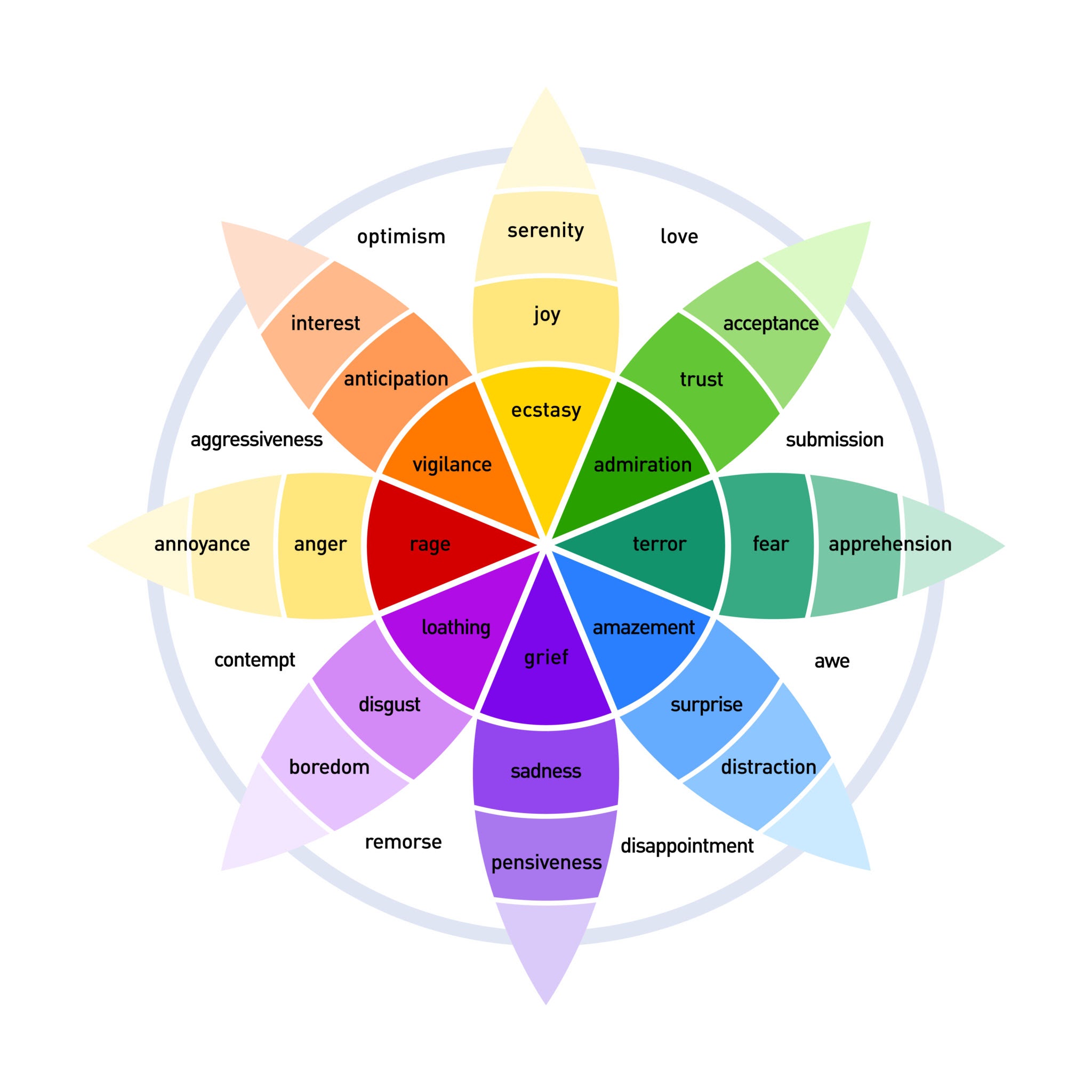
I wanted NewsInsight to capture this emotional spectrum. I didn’t want to just tell users what happened; I wanted to visualize how it felt.
NRC Emotion Model
I chose the NRC (National Research Council) emotion model because it’s well-established in sentiment analysis research. The eight emotions I track:
"emotions": {
    "anger": "high|medium|low|none",      # Frustration, outrage
    "anticipation": "high|medium|low|none", # Expectation, interest
    "disgust": "high|medium|low|none",    # Revulsion, disapproval
    "fear": "high|medium|low|none",       # Anxiety, concern
    "joy": "high|medium|low|none",        # Happiness, satisfaction
    "sadness": "high|medium|low|none",    # Grief, disappointment
    "surprise": "high|medium|low|none",   # Unexpected developments
    "trust": "high|medium|low|none"       # Confidence, reliability
}
Bedrock API Call
To get this data out of Claude, I had to be extremely specific. LLMs love to be verbose, so I wrote a system instruction that forces the model to act like a JSON API, not a chatbot.
SYSTEM_JSON_INSTRUCTIONS = (
    "You are an expert analyst. Return ONLY strict JSON."
    "Schema: {"
    "  \"overall_sentiment\": \"very_negative\"...\"very_positive\","
    "  \"emotions\": {"
    "    \"anger\": \"high|medium|low|none\","
    "    \"fear\": \"high|medium|low|none\","
    "    ... (all 8 NRC emotions)"
    "  }"
    "}"
)
Here is the function _analyze_with_bedrock_local that acts as the bridge between my raw text and the AI’s insight.
Note the heavy focus on fallback logic. If Bedrock times out or returns broken JSON (which happens), I don’t want the app to crash. I return a “Neutral” default object so the article is still readable, just without the fancy analytics.
def _analyze_with_bedrock_local(text: str) -> Dict[str, Any]:
    """Analyze article with Bedrock"""

    # Fallback for empty/short content
    fallback_summary = (text or "")[:400] + ("…" if text and len(text) > 400 else "")
    default_payload = {
        "overall_sentiment": "neutral",
        "sentiment": "neutral",
        "emotions": {},
        "summary": fallback_summary,
        "entities": []
    }

    if not bedrock or not BEDROCK_MODELID:
        return default_payload

    # Build Anthropic-format request
    payload = {
        "anthropic_version": "bedrock-2023-05-31",
        "max_tokens": 600,
        "messages": [
            {
                "role": "user",
                "content": [
                    {"type": "text", "text": SYSTEM_JSON_INSTRUCTIONS},
                    {"type": "text", "text": f"ARTICLE:\n{text}"}
                ]
            }
        ]
    }

    try:
        resp = bedrock.invoke_model(modelId=BEDROCK_MODELID, body=json.dumps(payload))
        body = json.loads(resp["body"].read())

        # Extract text from Claude's response
        chunks = [blk.get("text", "") for blk in body.get("content", []) if blk.get("type") == "text"]
        model_text = "\n".join(chunks).strip().strip("`")

        # Parse JSON response
        data = json.loads(model_text)

    except Exception as e:
        print(f"Bedrock analysis failed: {e}")
        return default_payload

    # Normalize sentiment values
    overall = (data.get("overall_sentiment") or "neutral").lower()
    if overall not in ["very_negative", "negative", "neutral", "positive", "very_positive"]:
        overall = "neutral"

    data["overall_sentiment"] = overall
    data["sentiment"] = _sentiment_bucket(overall)  # Simplified 3-bucket version

    return data
Sometimes the AI gets creative. Even though I asked for specific enums, it might return “terrible” instead of “very_negative.”
I wrote a helper function, _sentiment_bucket, to smooth out these edges before saving to the database. This ensures that when the frontend asks for “Red” articles, it gets everything that counts as negative.
def _sentiment_bucket(overall: str) -> str:
    if not overall:
        return "neutral"

    overall = str(overall).lower().strip()

    # Handle various sentiment formats
    if any(word in overall for word in ["very_negative", "negative", "bad", "poor", "terrible", "awful"]):
        return "negative"
    if any(word in overall for word in ["very_positive", "positive", "good", "great", "excellent", "amazing"]):
        return "positive"
    if any(word in overall for word in ["neutral", "mixed", "balanced"]):
        return "neutral"

    return "neutral"
Output Storage
This data is then stored in DynamoDB (for fast filtering) and S3 (for the full archival record), creating a searchable, emotion-rich news database.
DynamoDB (news_metadata table):
{
    "id": "abc123def456",
    "headline": "OpenAI Announces GPT-5...",
    "sentiment": "positive",
    "overall_sentiment": "very_positive",
    "emotions": {
        "anticipation": "high",
        "joy": "medium",
        "trust": "high",
        "fear": "low"
    }
}
S3 (Full processed document):
{
    "id": "abc123def456",
    "headline": "OpenAI Announces GPT-5...",
    "content": "Full article text...",
    "analysis": {
        "overall_sentiment": "very_positive",
        "emotions": {...},
        "summary": "Key takeaways...",
        "entities": [...]
    }
}
4.4 Layer 3: Entity Recognition
The Problem I Solved
We’ve all been there: You search for “Apple” and get a recipe for pie instead of the iPhone 16. Or you search for “AI” and miss a groundbreaking article about “Machine Learning” because the author never used the exact two letters “A” and “I”.
Standard keyword matching is brittle. I wanted NewsInsight to have Semantic Search—a search engine that understands concepts, not just strings.
Input Signal
I instructed Claude to act as a librarian. For every article, it extracts the key players—people, companies, locations, and technologies—and tags them in the metadata.
This means if an article mentions “ChatGPT” but not “OpenAI,” Claude will likely tag both because it understands the context.
I defined four critical categories that matter for news:
"entities": [
    {"type": "person|organization|location|technology", "text": "entity_name"}
]
Entity Types
| Type | Examples | Search Relevance |
|---|---|---|
person |
“Sam Altman”, “Elon Musk”, “Janet Yellen” | High for people-focused searches |
organization |
“OpenAI”, “Federal Reserve”, “Apple Inc.” | High for company/institution searches |
location |
“Silicon Valley”, “Washington D.C.”, “European Union” | Medium for geo-focused searches |
technology |
“GPT-5”, “blockchain”, “quantum computing” | High for tech topic searches |
Entity-Based Search Implementation
Now that I had these rich tags, I needed a search algorithm that respected them. I couldn’t just use a boolean “found/not found” check.
I built a Weighted Relevance Scorer that gives “Points” based on where the keyword appears.
-
10 Points (The Gold Standard): If the keyword matches an Entity. This means the AI has semantically verified that the article is about this topic.
-
8 Points: If it’s in the Headline.
-
4 Points: If it’s just in the Summary.
def calculate_relevance_score(item):
    score = 0
    search_term = topic.lower().strip()

    # Priority 1: Entities (10 Points)
    # If users search "Altman", and Claude tagged "Sam Altman", this is a perfect match.
    entities = item.get("entities", [])
    for entity in entities:
        e_text = entity.get("text", "").lower()

        if search_term in e_text:
            score += 10  # Jackpot!

    # Priority 2: Headlines (8 Points)
    if search_term in item.get("headline", "").lower():
        score += 8

    return score
Scoring Weights Rationale
| Field | Exact Match | Partial Match | Why This Weight? |
|---|---|---|---|
| Entities | 10 | 5 | AI-extracted entities are semantically verified |
| Headline | 8 | 3 | Editor-curated, high signal-to-noise |
| Summary | 4 | 1 | May contain tangential mentions |
Example Entity Output
For an article about OpenAI’s latest announcement:
{
    "entities": [
        {"type": "organization", "text": "OpenAI"},
        {"type": "person", "text": "Sam Altman"},
        {"type": "technology", "text": "GPT-5"},
        {"type": "technology", "text": "artificial intelligence"},
        {"type": "location", "text": "San Francisco"}
    ]
}
This article would now match searches for:
- “OpenAI” (exact organization match)
- “Sam Altman” (exact person match)
- “GPT” (partial technology match)
- “AI” (partial technology match via “artificial intelligence”)
- “San Francisco” (exact location match)
Storage Format
Entities are stored as a list in DynamoDB:
item = {
    "id": doc_id,
    "headline": "...",
    "entities": [
        {"type": "organization", "text": "OpenAI"},
        {"type": "person", "text": "Sam Altman"}
    ]
}
table.put_item(Item=item)
4.5 Layer 4: Quality Scoring
The Problem I Solved
Not all news articles are created equal. I needed a way to quantify article quality so I could prioritize high-quality content and filter out low-quality noise.
Quality Score Components
I designed a 0-100 quality score based on multiple factors:
"quality_score": 0-100,
"credibility_indicators": {
    "has_sources": true/false,      # +20 points
    "has_quotes": true/false,       # +15 points
    "factual_tone": true/false,     # +25 points
    "proper_attribution": true/false # +20 points
}
# Base score: 20 points for being parseable content
Credibility Indicators Deep Dive
1. Source Citation (has_sources)
- Does the article cite external sources?
- References to studies, reports, official statements
- Links to primary sources
- Weight: +20 points
2. Direct Quotes (has_quotes)
- Does the article include direct quotes from people?
- Indicates original reporting vs. aggregation
- Weight: +15 points
3. Factual Tone (factual_tone)
- Is the language objective and measured?
- Absence of sensationalism, hyperbole
- Balanced presentation of facts
- Weight: +25 points (highest because it’s hardest to fake)
4. Proper Attribution (proper_attribution)
- Are claims attributed to specific sources?
- “According to…” vs. unattributed claims
- Weight: +20 points
Quality Thresholds
I established three quality tiers:
| Score Range | Classification | Storage Destination | User Visibility |
|---|---|---|---|
| 70-100 | High Quality | news_metadata |
Shown to users |
| 50-69 | Medium Quality | content_review_queue |
Pending review |
| 0-49 | Low Quality | content_rejected |
Hidden |
Quality Assessment Prompt
classification_prompt = f"""
Analyze this article and provide a JSON response:

{{
    "category": "news_article|advertisement|opinion_piece|press_release|clickbait|spam",
    "quality_score": 0-100,
    "credibility_indicators": {{
        "has_sources": true/false,
        "has_quotes": true/false,
        "factual_tone": true/false,
        "proper_attribution": true/false
    }},
    "content_flags": ["promotional_language", "sensationalized_headline", ...],
    "recommendation": "accept|review|reject",
    "reasoning": "Brief explanation"
}}

Article Title: {article.get('headline', '')}
Article Content: {content[:2000]}
"""
Content Flags
I track specific quality issues:
| Flag | Description | Impact |
|---|---|---|
promotional_language |
Marketing-speak, sales pitch | -15 points |
sensationalized_headline |
Clickbait, exaggeration | -10 points |
missing_attribution |
Unattributed claims | -10 points |
poor_grammar |
Writing quality issues | -5 points |
duplicate_content |
Near-duplicate of existing | Reject |
Conversational Chat
I implemented a chat feature that lets users ask questions about articles:
def bedrock_chat(context_text: str, user_msg: str, history: List[Dict[str, str]]) -> str:
    """Chat with article using Bedrock"""

    # Build conversation history
    msgs = []
    for turn in history:
        msgs.append({"role": "user", "content": [{"type": "text", "text": turn["user"]}]})
        msgs.append({"role": "assistant", "content": [{"type": "text", "text": turn["assistant"]}]})

    # Add current question with article context
    msgs.append({
        "role": "user",
        "content": [{
            "type": "text",
            "text": f"Answer concisely using only this article:\n\n{context_text[:2000]}\n\nQuestion: {user_msg}"
        }]
    })

    body = {
        "anthropic_version": "bedrock-2023-05-31",
        "max_tokens": 600,
        "messages": msgs
    }

    resp = bedrock.invoke_model(modelId=BEDROCK_MODELID, body=json.dumps(body))
    # ... parse response
Example Conversation:
User: "What are the key improvements in GPT-5?"
AI: "According to the article, GPT-5 shows three main improvements:
     1. Enhanced reasoning capabilities
     2. Reduced hallucinations
     3. Better performance on complex tasks"

User: "When will it be available?"
AI: "The article mentions a planned Q2 2024 release, with
     enterprise customers getting early access."
Error Scenarios & Responses
| Scenario | Fallback Behavior | User Impact |
|---|---|---|
| Bedrock unavailable | Use default neutral sentiment | Article displays with “neutral” badge |
| JSON parse failure | Use raw text as summary | Summary may be less structured |
| Timeout (>30s) | Return defaults | Article still stored |
| Rate limit | Return defaults, log error | Temporary degradation |
| Invalid sentiment value | Normalize to “neutral” | Consistent UI display |
Minimum Content Check
I skip AI analysis for very short content to avoid wasting API calls:
def analyze_with_bedrock(self, text: str) -> Dict[str, Any]:
    # Minimum content check
    if not text or len(text.strip()) < 50:
        return {
            "overall_sentiment": "neutral",
            "sentiment": "neutral",
            "emotions": {},
            "summary": text[:200] + "..." if text else "",
            "entities": []
        }

    # Proceed with full analysis...
4.6 Performance Optimization
Token Management
I carefully manage token usage to control costs:
# Truncate article content to 2000 chars (~500 tokens)
f"ARTICLE:\n{text[:2000]}"

# Limit response tokens
"max_tokens": 600  # Sufficient for JSON response
Batch Processing
During nightly ETL, I process articles with rate limiting:
def process_category(self, category: str):
    for article in all_articles:
        # Process article...
        processed += 1

        # Rate limiting to avoid API throttling
        if processed % 10 == 0:
            import time
            time.sleep(1)  # 1 second pause every 10 articles
Cost Analysis
| Operation | Tokens | Cost per Article |
|---|---|---|
| Input (article + prompt) | ~800 | $0.0002 |
| Output (JSON response) | ~400 | $0.000125 |
| Total per article | ~1200 | ~$0.000325 |
Monthly Cost Estimate:
- 300 articles/night × 30 days = 9,000 articles
- 9,000 × $0.000325 = ~$2.93/month for AI processing
Key Metrics I Track
| Metric | Target | Alert Threshold |
|---|---|---|
| AI analysis success rate | >95% | <90% |
| Average response time | <500ms | >1000ms |
| JSON parse success rate | >99% | <95% |
| Articles processed/night | ~300 | <200 |
4.7 Issues Encountered & Resolutions
Issue 1: Inconsistent JSON Output
-
Problem: Claude occasionally returned markdown-wrapped JSON or extra text.
-
Solution: Strip markdown code blocks and validate JSON:
model_text = model_text.strip().strip("`")
if model_text.startswith("json"):
    model_text = model_text[4:].strip()
try:
    data = json.loads(model_text)
except json.JSONDecodeError:
    # Use raw text as summary fallback
    data = default_payload.copy()
    data["summary"] = model_text
Issue 2: Sentiment Value Normalization
-
Problem: Claude sometimes returned creative sentiment values like “cautiously optimistic” or “mixed positive.”
-
Solution: Strict validation with fallback:
overall = (data.get("overall_sentiment") or "neutral").lower()
if overall not in ["very_negative", "negative", "neutral", "positive", "very_positive"]:
    overall = "neutral"
Issue 3: Entity Extraction Inconsistency
-
Problem: Entities sometimes returned as strings instead of objects.
-
Solution: Handle both formats:
for entity in entities:
    entity_text = ""
    if isinstance(entity, dict):
        entity_text = (entity.get("text") or "").lower()
    elif isinstance(entity, str):
        entity_text = entity.lower()
Issue 4: Rate Limiting During Bulk Ingestion
-
Problem: Processing 300+ articles triggered Bedrock rate limits.
-
Solution: Implemented progressive backoff:
if processed % 10 == 0:
    time.sleep(1)  # Pause every 10 articles
Check out the code: github.com/VineetLoyer/NewsInsight.ai